Update an existing CDK app
On this page
In this post, we’ll update an existing CDK app that uses Python as the programming language.
If you haven’t created a new CDK app yet, follow the steps in Creating a new CDK app with Python.
Ensure that AWS CDK is installed & configured before proceeding.
Updating an existing CDK app
We can simply update the stack bby modifying the cdk_app/cdk_app_stack.py file.
For example, we can change the retention policy by modifying the cdk_app/cdk_app_stack.py file as follows:
from aws_cdk import (
    Stack,
    aws_s3 as s3,
    RemovalPolicy, # New Import
)

from constructs import Construct

class CdkAppStack(Stack):

    BUCKET_ID = "MyFirstBucket"

    def __init__(self, scope: Construct, construct_id: str, **kwargs) -> None:
        super().__init__(scope, construct_id, **kwargs)

        # Updated code. This will delete the bucket when the stack is deleted
        s3.Bucket(self, id="MyFirstBucket", removal_policy=RemovalPolicy.DESTROY)
Check the changes by running cdk diff. As you can see below, there is a change in Bucket policy being implemented.
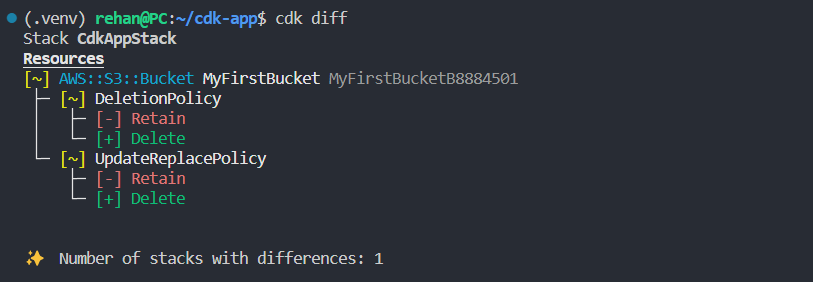
Now run cdk deploy to deploy the changes. When you destroy the stack by running cdk destroy, you’ll notice that the bucket is deleted as well.
Need help?
Start a discussion on GitHub if you’ve got questions or improvements. Open discussions →
Series
AWS CDK
Related posts
Running a Web Server in a Private Subnet secured
Creating a 3-Tier Network Architecture VPC with AWS CDK in Python
Running Lambda Functions in a VPC with AWS CDK in Python
Using multiple environments AWS CLI and profiles with CDK
Configure log retention and removal policy for Lambda function using AWS CDK in Python